
Accountability Theater Is Easy. Accountability Infrastructure Takes Thought.
DOGE’s mass email mandate was a masterclass in what not to do, and a blueprint for what to build instead.
By Harvey Kadyanji
In February 2025, the Department of Government Efficiency sent a now-infamous email to federal employees across the United States. The message was simple: reply with five bullet points summarizing what you did last week. Failure to respond would be treated as a resignation.
It made headlines. It sparked outrage. It became a cultural moment.
But here is the thing nobody was saying loudly enough: it was not an attempt to actually solve a problem. It was theatrics. A mass email with a deadline attached is not a management system. It is a pressure tactic dressed up as accountability.
If DOGE genuinely wanted visibility into what 2 million federal employees were doing every week, they would not have sent an email blast. They would have built something.
So I spent an afternoon building what they should have built instead. It costs $5 a month to run.
What the Email Actually Revealed
The DOGE approach exposed a real and legitimate problem: large organizations often have no structured, queryable record of what their people are working on. Leadership makes decisions based on vibes, reports compiled manually by middle managers, or documents that are already three weeks out of date by the time they surface.
That is a real problem worth solving.
But the solution they chose created more chaos than clarity. Thousands of employees replied to a single email thread. There was no standard format. No way to filter by department. No way to query across teams. No way to track trends over time. What leadership received was an avalanche of unstructured text that would have taken a team of analysts weeks to make sense of.
The deeper flaw: a mass email system can only tell you the percentage of inboxes that replied. It cannot tell you which specific departments are dark. It cannot tell you that Operations has filed nothing in three weeks while Finance is submitting every Friday. It gives you a number. It does not give you a signal.
The form of the solution signaled that the goal was never operational clarity. It was compliance theater.
What a Real Solution Looks Like
If you actually want to know what your organization is doing week to week, you need three things:
- A consistent, low-friction way for people to submit updates
- A system that parses and structures those updates automatically
- A dashboard where leadership can query by team, by role, by time period, and immediately see who has not filed
The good news is this is not a hard engineering problem. Modern infrastructure makes it surprisingly buildable in a single afternoon. The interesting part is the architectural decisions along the way.
Here is how I built it, and what I learned in the process.
The Architecture
→ Try the live demo at govmailtest.com
TL;DR for non-technical readers: I used serverless edge computing to process inbound emails instantly, store them in a lightweight database, and display them on a real-time dashboard. The result is a system that requires zero maintenance and costs $5 a month. Here is how the plumbing works for the engineers. Everyone else can skip to the dashboard section below.
The system has four components: an email sending layer, an email intake worker, a database, and a reporting interface.
Why Email and Not a Form
The instinct is usually to build a form. A structured input with required fields feels cleaner from a developer’s perspective.
But forms create friction. People delay filling them out. They open a new tab, get distracted, come back later, forget. Completion rates drop.
Email lives in the workflow most people are already in. You finish your week, you write a quick note, you send. The cognitive cost is much lower. And critically, it feels like any other work communication rather than a compliance checkbox.
The trick is what happens on the other end.
Sending Email Natively at the Edge
The first challenge is onboarding: when someone registers, they need to receive an email from your domain. The traditional answer is a third-party transactional email service: Resend, SendGrid, Mailgun.
But Cloudflare now has something better built in.
In April 2026, Cloudflare Email Service graduated to public beta. It lets you send transactional email directly from a Worker with a simple API call: no external service, no extra API keys, no separate billing relationship. SPF, DKIM, and DMARC records are configured automatically when you add your domain. The email is sent from your domain, authenticated, and delivered.
The one catch: it requires the Workers Paid plan at $5 per month. But that $5 is account-wide: it unlocks Email Service, Workers AI, D1’s generous limits, and everything else across every project on your account simultaneously. For most teams, it is the right trade.
Receiving and Processing Email with a Worker
When a registered user replies to their weekly prompt, that email needs to arrive somewhere, be read, and be turned into a structured database record. The traditional approach is a server running somewhere waiting for inbound mail.
Cloudflare Email Workers changes the picture entirely. Instead of provisioning a server, configuring a mail handler, and managing uptime, you write a small function that fires every time an email arrives at your address. It wakes up, parses the message, writes to the database, and goes back to sleep. You pay for nothing when it is idle. It scales automatically. There is no infrastructure to manage.
Here is what that function does on each incoming email:
- Parse the full MIME message using
postal-mime - Extract the subject line:
[GovMail] Engineering · Software Engineer · May 2026 - Parse department, role, and month from the subject
- Extract and clean the reply body, stripping quoted previous messages
- Run basic moderation: block spam, redact profanity
- Write a structured record to the database
- Forward a copy to the author’s inbox
One subtlety worth knowing: in Cloudflare Email Workers, message.headers.get("subject") returns empty. The subject is encoded inside the raw MIME payload, not accessible through the headers object directly. You have to parse the full email with postal-mime and read email.subject from the parsed result. This is not documented prominently and cost a debugging session to discover.
Why D1 and Not a Spreadsheet
The DOGE approach, if it had any follow-through at all, probably ended up in a spreadsheet somewhere. Spreadsheets are the default when there is no time to think.
The problem with spreadsheets is they do not scale, they do not query well, and they require a human to maintain structure. When you have submissions from six departments across three months and you want to ask “show me everything from Finance in April,” a spreadsheet becomes a manual filtering exercise.
Cloudflare D1 is a lightweight SQLite database that lives at the edge, right next to the worker. It does not require a database administrator. It costs nothing on the free tier for reasonable volumes. And it gives you real queries: filter by department, group by month, count reports per team, find who has not submitted in three weeks.
That last one is the one that actually matters.
Role-Level Visibility: Beyond Departments
The first version of the leadership dashboard tracked submissions by department. Engineering filed. Finance filed. Communications did not. Useful, but still coarse.
The more revealing view is by role within each department. A department can show four submissions while two specific roles (say, Security Engineer and Field Operator) have never filed once. Those are the blind spots that matter.
The real system tracks submission coverage at the role level. The dashboard shows not just which departments are dark, but which specific functions within reporting departments have gone silent. Out of 30 defined roles across six departments, you can see exactly how many have filed and how many have not. DOGE’s approach could only give you a reply rate across inboxes. This gives you a named accountability map.
AI-Generated Sample Updates
A small addition worth mentioning: the compose interface includes an AI autofill button. It uses Cloudflare Workers AI (specifically Llama 3.3 70B running at the edge) to generate a realistic sample weekly update based on the selected department and role. A Finance/Budget Analyst gets a draft about variance analysis and reforecast reviews. A Press Secretary gets one about media queries and briefing prep.
It is not the point of the system. The point is that people write their own real updates. But for a demo, being able to instantly generate a plausible update for any role makes the concept immediately tangible. And it runs entirely within the same Cloudflare account, with no external model API, as part of the $5 monthly plan.
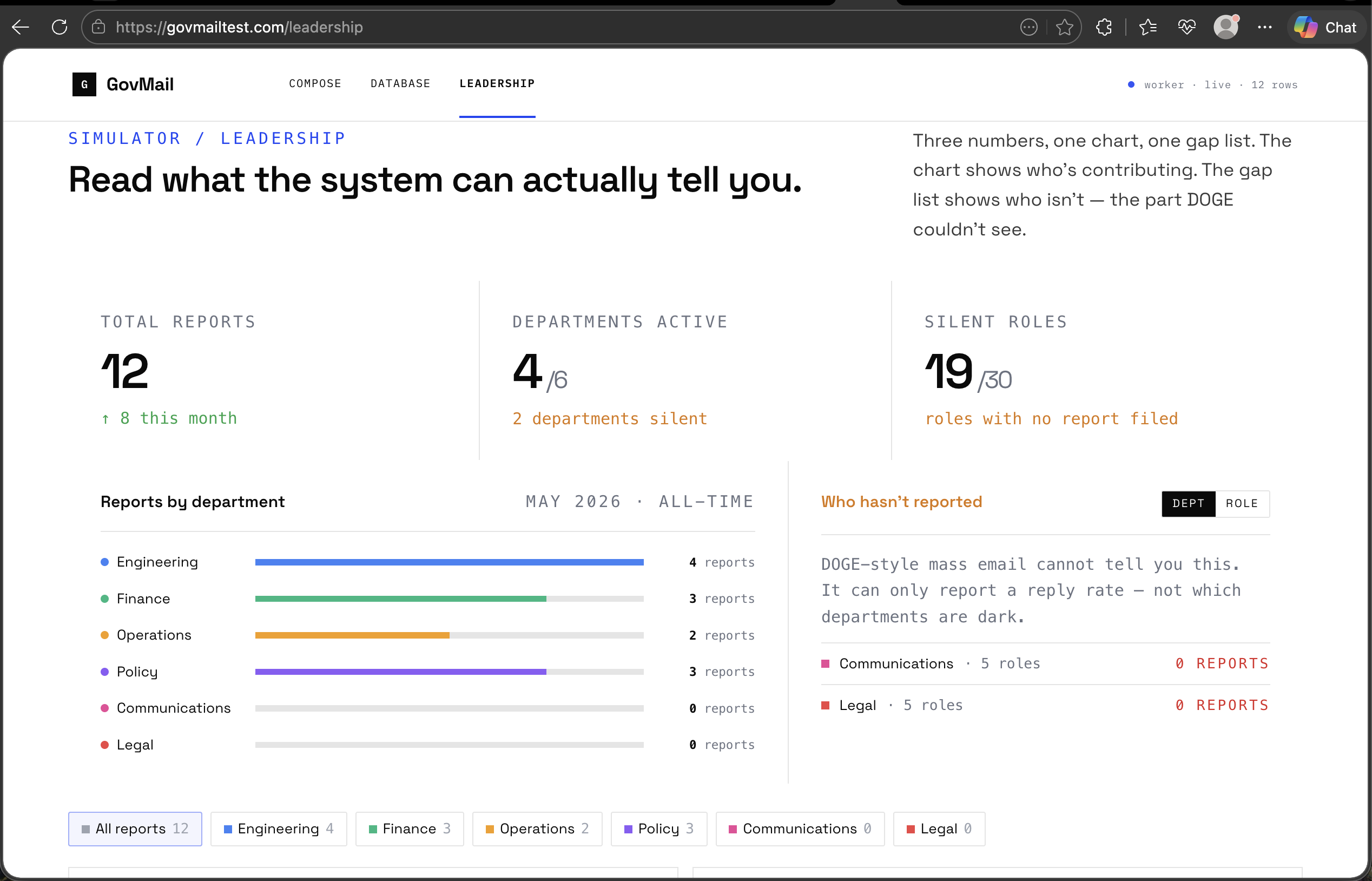
The Three Questions This System Can Answer That DOGE’s Email Cannot
What is Engineering working on this month? Query the database, filter by department and date range, get every structured update. No chasing inboxes.
Which teams are submitting and which specific roles are not? The dashboard shows submission coverage at the role level. You know immediately not just that Communications is underreporting, but that the Speechwriter and Social Media Lead have not filed in two months.
How has a team’s output changed over the past quarter? With structured records going back months, you can spot trends: volume, word count, recurrence of themes. With an email blast, you have a one-time snapshot that ages immediately.
What It Cost to Build
The entire stack runs on Cloudflare:
- Pages (free): the frontend
- D1 ($0 at this scale): the database
- Email Routing (free): receiving inbound email
- Email Service ($5/month, account-wide): sending onboarding emails
- Workers AI (included in the $5 plan): the autofill feature
- Email Workers (included): the inbound processing function
Total infrastructure cost: $5 per month. That is the entire stack for a system that can handle a real organization’s weekly reporting cycle, with persistent storage, AI-assisted drafting, and role-level gap detection.
The fact that DOGE chose a mass email with a resignation threat says everything about what the actual goal was.
The Deeper Point
Government bureaucracy has real inefficiencies. The argument that large organizations need better operational visibility is not wrong. But visibility requires infrastructure, not pressure.
Sending a mass email with a resignation threat does not tell you what your organization is doing. It tells you who is willing to comply under duress. Those are completely different questions.
The system described above is not a research prototype. It is running right now at govmailtest.com. You can register, receive an onboarding email, reply with a weekly update, and watch it appear in the database. The leadership view shows real gap detection: which departments are filing, which roles within them are silent, and what the submission trends look like over time.
A small team could have this built and running in an afternoon. The fact that it was not built (that a mass email was sent instead) is the story.
Accountability theater is easy. Accountability infrastructure takes a little more thought.
Try It Yourself
The demo below simulates the full system. Pick a department and role, write a weekly update (or generate one with AI), and watch it flow through the worker pipeline into a structured database. Then switch to the Leadership View to see the gap detection layer: which departments are reporting, which roles within them are dark, and what the system can actually tell you.
→ Open GovMail at govmailtest.com
If you want to go further, register with your real email. You will receive an onboarding message from updates@govmailtest.com. Reply to it with whatever you worked on this week. Your reply will be parsed by the email worker, written to the database, and appear in the leadership view within seconds.
I am always interested in connecting with builders and leaders who understand the difference between compliance theater and accountability infrastructure, whether you are thinking about this for a government agency, a startup, or a distributed team.